Solana Explorer Guide to Reading Transactions
Solana passed its billionth transaction on June 18, 2020, according to Solana's June newsletter. A ledger that large needs more than a wallet's activity feed. Traders need a way to inspect what happened, which accounts changed, and which programs executed before trusting a chart or a token promoter's explanation.
Solana Explorer gives you that evidence, but it doesn't turn evidence into a safety guarantee. A signature can prove a transaction executed on a particular network. It can't, by itself, prove that buyers are independent, that liquidity will remain available, or that a token is safe to trade.
Table of Contents
- What the Solana Explorer Shows Right Now
- Which Solana Explorer Fits the Job
- Read an Address Page Without Guessing
- Addresses That Look Separate on the Page
- Failed Swaps and the Fee You Still Paid
- How to Read One Solana Transaction
- Build an Audit You Can Recheck
- Read the Chain Then Explain the Token
What the Solana Explorer Shows Right Now
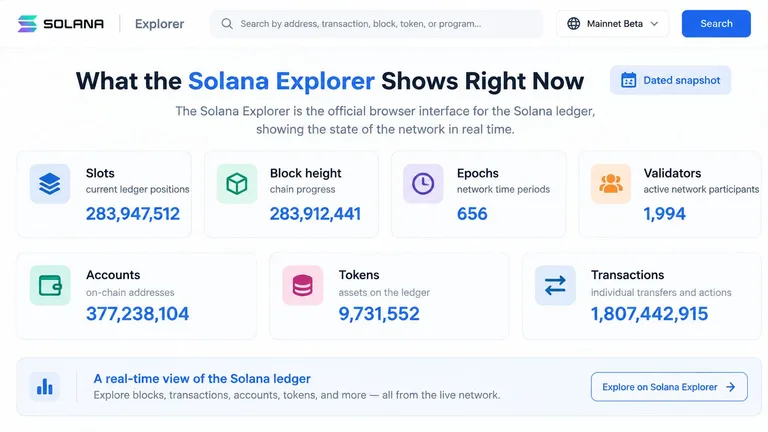
Solana Explorer is the official browser interface for the Solana ledger. It lets you inspect slots, block height, epochs, validators, accounts, tokens, and individual transactions.
An indexed view of the official Solana Explorer showed more than 564.4 billion cumulative transactions and approximately 1,921 transactions per second, but its capture date wasn't recorded. Treat those figures as an undated snapshot, not today's network reading or a permanent measure of activity.
The dashboard groups the network's live ledger information into browsable fields.
Say you open the dashboard while a meme coin is attracting attention. A busy network doesn't establish that buyers are purchasing that particular token. Votes, wallet transfers, swaps, and other program interactions contribute different kinds of activity, while a complex DeFi operation requires more computation than a simple send.
The explorer verifies the public ledger. It doesn't grade a token.
Read slots as ledger positions, block height as chain progress, and epochs as network time periods. These fields help place an event in context, but token demand requires token-specific evidence.
Before interpreting activity, identify the relevant mint, choose the appropriate explorer view, and find the signatures behind the displayed trades. A network activity counter is context. The transaction record is where verification begins.
Which Solana Explorer Fits the Job
Solana explorers by research job
| Explorer | Open it for | Shows well | Do not treat it as |
|---|---|---|---|
| Solana Explorer | Cluster stats, slots, epochs, raw transactions | Canonical mainnet-beta, devnet, and testnet records | A safety score or wallet-link narrative |
| Solscan | Token pages, holders, labeled transfers | Scannable account and token history | Proof that a label or holder list is complete |
| SolanaFM | Following value between accounts | Visual transfer and account flow | Proof that linked-looking wallets committed fraud |
| Orb | Readable instruction summaries | Parsed actions when raw logs are dense | A full view if inner program calls are skipped |
Pick an explorer by the question you need answered, not by how reassuring its interface looks. A holder table, a transfer graph, and a raw execution record organize related evidence differently.
For a missing deposit, start with the signature and status. For a token distribution check, a holder-oriented page is easier to scan. For a funding investigation, follow transfers between accounts rather than repeatedly opening a token chart.
Choose a primary view and a verifier
Use one primary explorer so you learn where it places fees, account changes, and program instructions. Keep the official page available when a third-party description seems inconsistent with the underlying transaction.
A label is an interpretation attached to an address or program. It can help you find your way, but it shouldn't replace checking the actual address. Similar names, familiar icons, or an exchange label don't establish who controlled an account during the event you're investigating.
Parsed actions deserve the same caution. A readable swap summary is useful for orientation, but you still need the underlying instruction details when the amount received, destination, or program behavior looks unexpected.
Practical rule: Use convenience features to find the evidence, then use the execution record to test the explanation.
Choose the network before judging the result
Mainnet-beta, devnet, and testnet are separate clusters, not different display modes for one shared account balance. The same address can represent unrelated state across them.
If someone sends you a transaction page as proof of a live purchase, check the cluster selector before interpreting anything else. A successful test transaction doesn't verify a mainnet purchase.
When explorer pages disagree, compare the exact signature, cluster, and confirmation context before assuming one is wrong. Then compare account addresses and balance changes. This keeps a disagreement about presentation from turning into an unsupported claim about the trade.
Read an Address Page Without Guessing
Start with the exact address, not its nickname. Paste it into the explorer and confirm that you're inspecting the intended cluster. Then establish whether the page represents a wallet, token account, mint, or another program-controlled account.
Read the SOL balance as a current holding, not lifetime profit. A wallet can receive funding, spend it, and receive more without its present balance explaining any of those events. The owner field provides a different clue: it identifies the program that owns the account at the protocol level.
Address and mint field checklist
| Field | What to establish | Reason to investigate |
|---|---|---|
| SOL balance | Current native balance | A balance alone doesn't explain funding or returns |
| Owner program | What kind of account you're reading | An unexpected owner changes how the account should be interpreted |
| Token accounts | Holdings associated with each mint | Similar names can conceal different assets |
| Mint authority | Whether additional supply can be minted | An active authority retains supply-changing power |
| Freeze authority | Whether token accounts can be frozen | An active authority retains a control traders should understand |
| Transaction history | Funding, purchases, and subsequent outflows | The sequence can reveal behavior the current balance hides |
A normal wallet is generally owned by the System Program. A token account is owned by a token program, while its token-owner authority identifies who controls the holdings. Program ownership and wallet control aren't interchangeable fields.
For token holdings, match the mint address, not just the ticker. Open the mint page to inspect its authorities. An active authority is a capability, not proof that its controller has abused it, and removed authorities don't settle every other token risk.
Read the history as a sequence
Find the earliest visible funding, the first relevant purchase, and later transfers or sales. Follow the signatures behind those events rather than inferring a story from the current balance.
Use the creator-wallet investigation checklist when the address belongs to a deployer or suspected creator. Save dated observations so you can distinguish a persistent holding from a temporary snapshot.
Addresses That Look Separate on the Page
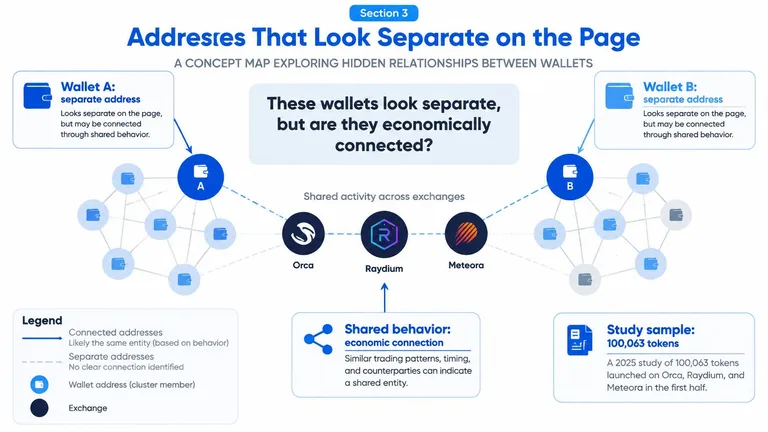
Separate addresses don't necessarily mean independent buyers. The useful question is whether those wallets have economic connections that a holder list doesn't show.
A large-scale study of tokens launched on Orca, Raydium, and Meteora examined 100,063 tokens from the first half of 2025, identifying 76,469 candidate rug pulls, at least $151 million in direct losses, and 78 recurring syndicate structures. Those are findings within that study's sample and methodology, not a probability that any token you open is fraudulent.
Wallet relationships are easier to reason about when you map the transfers rather than reading addresses as isolated rows.
Follow funding before interpreting distribution
Consider a hypothetical launch whose holder page appears broadly distributed. Several prominent buyers received SOL from the deployer shortly before purchasing, then sold within a tight execution window.
The address count hasn't changed, but your interpretation should. You now have evidence that some buyers may not be economically independent.
Check the actual sequence:
- Shared funding: Identify the source transfers and whether the source is a private wallet, exchange, or service used by unrelated people.
- Synchronized execution: Compare purchase and sale timing, including slot proximity, without assuming timing alone proves shared control.
- Repeated creator relationships: Look for earlier interactions and recurring launch patterns.
- Coordinated outflows: Check whether proceeds converge on a common destination after sales.
A common exchange withdrawal source is weaker evidence than a deployer directly funding buyers immediately before launch. Timing becomes more informative when it accompanies funding links and repeated behavior.
Separate coordination from wrongdoing
A market maker, trading operation, or high-volume participant can produce clustered activity without committing fraud. A graph shows relationships between observed accounts. It doesn't establish a person's identity, intent, or legal responsibility.
Evidence boundary: A suspicious connection is a reason to investigate, not a verdict.
The absence of a visible connection doesn't prove independence either. Funding may originate outside the transactions you inspected, and an incomplete history limits what you can conclude.
Our policy is to treat suspicious activity and potentially linked wallets as items to examine, not evidence of wrongdoing. Missing data must not be interpreted as proof of safety.
Use the guide to checking whether a Solana token is bundled to organize those follow-up questions around launch execution and wallet relationships.
Keep the signatures behind any visual explanation so the claimed connections remain checkable.
Failed Swaps and the Fee You Still Paid
What a Solana transaction page implies for your SOL
| What the page shows | SOL spent | Usual meaning | Check next |
|---|---|---|---|
| Success, fewer tokens than expected | Trade input and fees; account funding may also apply | Slippage or a moved quote | Pre and post token balances |
| Failed, no token balance change | Base fee plus any priority fee for a processed failure | Execution rejected an instruction | Log messages for the error |
| Compute budget exceeded | Fee still charged if processed | Execution exceeded the available compute budget | Compute limit and consumed units |
| Blockhash expired | No fee when rejected before processing | Stale transaction, not proof of a frozen mint | Whether a fresh attempt landed |
| Repeated failures and unusual program logic | Fees stack on each processed retry | Possible transfer restriction requiring investigation | Authorities, extensions, and inner instructions |
Failed doesn't mean free. Solana's fee-structure documentation describes a 5,000-lamport base fee and an optional priority fee calculated from compute-unit price and compute-unit limit, with fees charged even when a processed transaction fails.
The distinction between processed failure and rejection before processing matters. A wallet notification saying a swap didn't complete isn't enough to determine whether a transaction landed and incurred a fee.
Separate the fee from the trade
On a successful swap, your total SOL reduction can include the trade input, transaction fees, and account funding. Don't describe the entire balance reduction as a network fee. Compare the fee field with the instruction effects and account balances.
On a processed failure, the attempted swap's state changes are rolled back, but the transaction fee remains charged. No purchased tokens and less SOL can therefore be consistent with normal transaction failure rather than theft.
Also check whether the interface displays a total fee alongside a separate priority-fee component. Don't add them together unless the presentation makes clear they're independent amounts.
Read the error before retrying
A slippage error means the execution couldn't satisfy the trade's price constraint. Increasing slippage accepts a wider range of outcomes; it doesn't diagnose the token or make the trade safer.
A compute-budget error points to execution resources. Raising the priority price isn't the same as increasing the compute limit, and paying more for scheduling won't fix an instruction that the program must reject.
An expired blockhash points to transaction freshness. Search for a replacement signature before concluding the purchase never happened, because a wallet may have submitted another attempt.
Priority fees can rise during busy periods. A higher fee can improve scheduling, but it can't guarantee a fill, a favorable price, or successful program execution.
Pause automatic retries when the cause remains unexplained. Repeated failures combined with restrictive transfer behavior or abnormal instructions justify a deeper token review, while each processed failed attempt can add another fee.
How to Read One Solana Transaction
Use a signature to investigate a specific claim: a purchase completed, liquidity moved, or tokens reached a destination. Solana's transaction-structure documentation explains why the message and execution metadata matter: account indices, lookup-table addresses, and inner program calls can carry details that a summary omits.
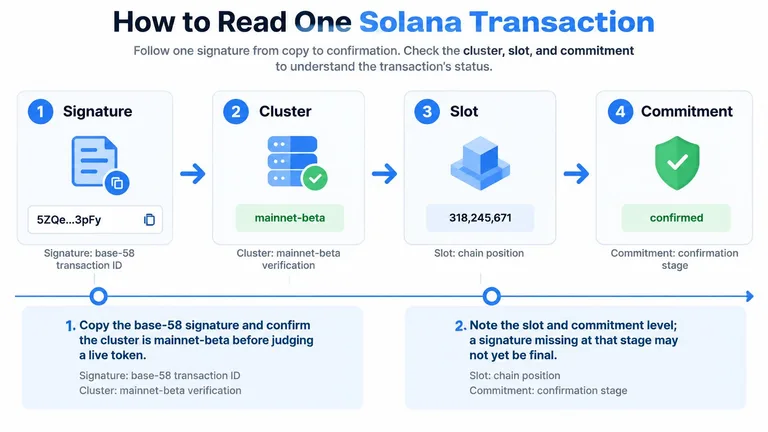
Keep the audit path visible while you inspect the record.
Follow the execution record
Copy the base-58 signature and confirm the cluster. For a live token trade, verify mainnet-beta rather than relying on the wallet's description. The signature is your transaction identifier, not the token's mint address.
Record the slot and commitment context. The slot places the transaction in the ledger. A signature unavailable at the requested commitment isn't automatically a failed trade.
Read status, then fee. Establish whether execution succeeded before interpreting the displayed action. Record what was charged separately from what the trade was supposed to spend.
Resolve all account keys. Include static message accounts and addresses loaded through Address Lookup Tables. Looking only at the signer can omit pools, vaults, destinations, and other accounts involved in execution.
Follow outer instructions and their inner calls. Read each outer instruction with the cross-program invocations it triggered. Preserve that nesting instead of treating the page as a flat list of unrelated transfers.
Compare pre and post balances. Check SOL changes and token changes for the exact mint and token accounts involved. Confirm that the destination gained the asset the claim describes.
Write a bounded conclusion. State which account changes and program executions the record establishes. Keep claims about identity, intent, independence, or future behavior outside that conclusion unless you have additional evidence.
Read the itemized bill
The summary line is the receipt total. The instruction tree is the itemized bill.
A transaction message contains a header, account addresses, a recent blockhash, and compiled instructions. Versioned transactions can obtain additional account addresses from lookup tables, while programs can call other programs during execution.
That means a user-facing swap may include account creation, token transfers, pool interactions, and other operations. The program that moves tokens may appear inside an inner call rather than as the headline action.
Record the involved program IDs and resolved accounts when something looks unusual. Trust the full instruction tree and balance deltas, not the signer alone or a wallet app's transfer chip.
Build an Audit You Can Recheck
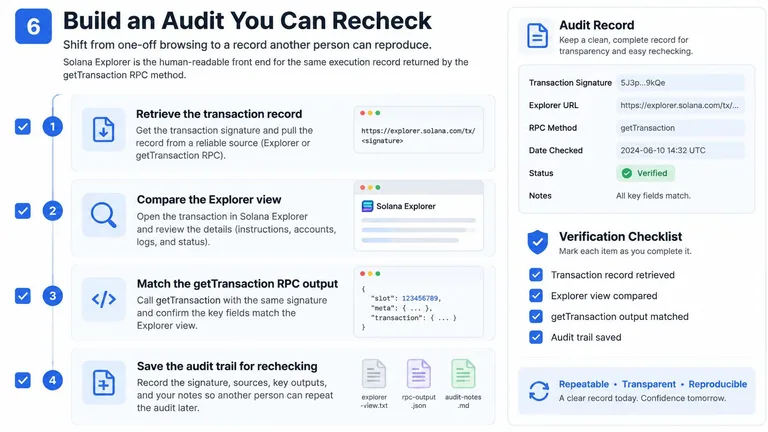
A screenshot is a useful note, but it's a weak audit file. Cropping can remove the cluster, account addresses, or failure status, and explorer labels can change without the underlying transaction changing.
Solana Explorer is the human-readable view of execution evidence also available through the getTransaction RPC method. Retrieve a transaction by its signature and preserve the response alongside your interpretation.
A repeatable workflow keeps the evidence separate from the conclusion.
Save the record and the request context
When available at the requested commitment, the response can include the slot, message, account keys, instructions, fee, execution status, logs, balance changes, token-balance changes, and inner instructions. A null response means the signature wasn't found at that commitment, not that the RPC has returned a failed execution record.
Save these items together:
- Transaction identity: Signature, cluster, slot, and retrieval time.
- Request settings: Commitment, encoding, and supported transaction-version setting.
- Execution evidence: Status, fee, logs, program IDs, resolved accounts, and instruction sequence.
- Account effects: Pre and post SOL balances and token balances, matched to the relevant addresses and mints.
For scripts, set maxSupportedTransactionVersion explicitly to a version your client can decode. A version-handling failure is a tooling problem, not evidence that the token transaction was invalid.
Make each conclusion reproducible
Ask whether token accounts changed as claimed, which programs ran, and whether the creator's relevant history supports the explanation being offered. Questions about other activity in the same slot require retrieving those additional transactions, not extrapolating from the signature you already have.
Keep observations separate from inferences in your notes. “These accounts received funding from this address” is an observation supported by transfers. “The same person controls them” requires further evidence.
A useful audit lets another person reproduce both the record and the reasoning. Store the raw response, your parsing settings, and a short conclusion so a later reviewer doesn't have to reconstruct your assumptions from a screenshot.
Read the Chain Then Explain the Token
Choose the next action according to what remains unknown. If you only need to verify that a signature exists, a fee was paid, or a token balance changed, the explorer can answer that question directly. Save the identifying fields and stop short of turning confirmation into an investment judgment.
If you need to assess liquidity, holder concentration, creator behavior, and trading patterns together, you need interpretation across records. A successful transaction doesn't resolve those questions, and a polished chart doesn't supply the missing context.
Choose interpretation when the question is broader
MemeAssist currently focuses exclusively on Solana. Our explained reports combine on-chain and market evidence into an Overall Health Score, Rug Risk Rating, AI Verdict, and Detailed Risk Breakdown, covering liquidity, holder distribution, creator behavior, wallet activity, trading patterns, and historical risk indicators. We also offer free scanners, charts, and explorers for readers who prefer to gather and interpret evidence themselves.
Choose us for integrated research, explanations, and tracking, not exclusive blockchain data, safety guarantees, or profit promises. A rating remains an interpretation of available evidence, not permission to ignore position size or uncertainty.
Use the Solana token safety-check framework to decide which unresolved questions deserve attention before buying. Bring the exact mint address and the signatures that prompted concern.
A useful risk conclusion explains both the evidence and what remains unknown.
Don't buy merely because the transaction succeeded or reject a token solely because a swap failed. Make the decision on the combined evidence, with suspicious links treated as leads and unavailable information recorded as uncertainty.
Visit MemeAssist to turn your Solana Explorer findings into an explained token report covering liquidity, holders, creator behavior, and trading activity. Paste the mint address, compare the report with your saved transaction evidence, and investigate unresolved warnings before deciding whether to trade.
Topics: Solana Explorer, Solana transactions, block explorer, token audit, wallet analysis
Informational only, not financial advice. Meme coins are extremely high-risk.
All articles