Key Learnings
- 01Separate token safety from entry quality, then choose evidence relevant to an entry, an existing holding or a fresh launch.
- 02Start with one free full analysis if eligible. A $5 top-up funds 25 analyses at the checked $0.20 price only when the credit is spent entirely on analyses; monitoring and other tools cost extra.
- 03Free tools remain useful. Our case is a guided Solana report and follow-up without a recurring subscription—not exclusive features, guaranteed outcomes or the lowest price at every usage level.
By MemeAssist Research · Published and updated 21 October 2026. Product examples are dated snapshots, not current trading signals.
Researching a memecoin can mean opening a chart, checking the contract, inspecting holders and trying to work out whether the wallets selling belong to early buyers or the creator.
Even with all those tabs open, you can still be left wondering: what does this mean for my trade?
We built MemeAssist to help you work through that question. Our Solana memecoin analyser brings visual evidence, AI explanations, conditional trade setups and ongoing monitoring into one place—with guidance that reflects whether you’re considering an entry, already holding or watching a fresh launch.
Here’s what that means when you analyse a token.
Make sense of the data with visual analysis
On-chain data can be difficult to digest. Long wallet addresses, transaction tables and isolated percentages take time to interpret, particularly when you’re trying to understand several risks at once.
We put visual analysis at the centre of MemeAssist.
Score gauges help you orient yourself. Colour-coded signal panels organise the evidence. Wallet constellations help you explore early supply exposure. Comparison cards show what improved or deteriorated since an earlier analysis.
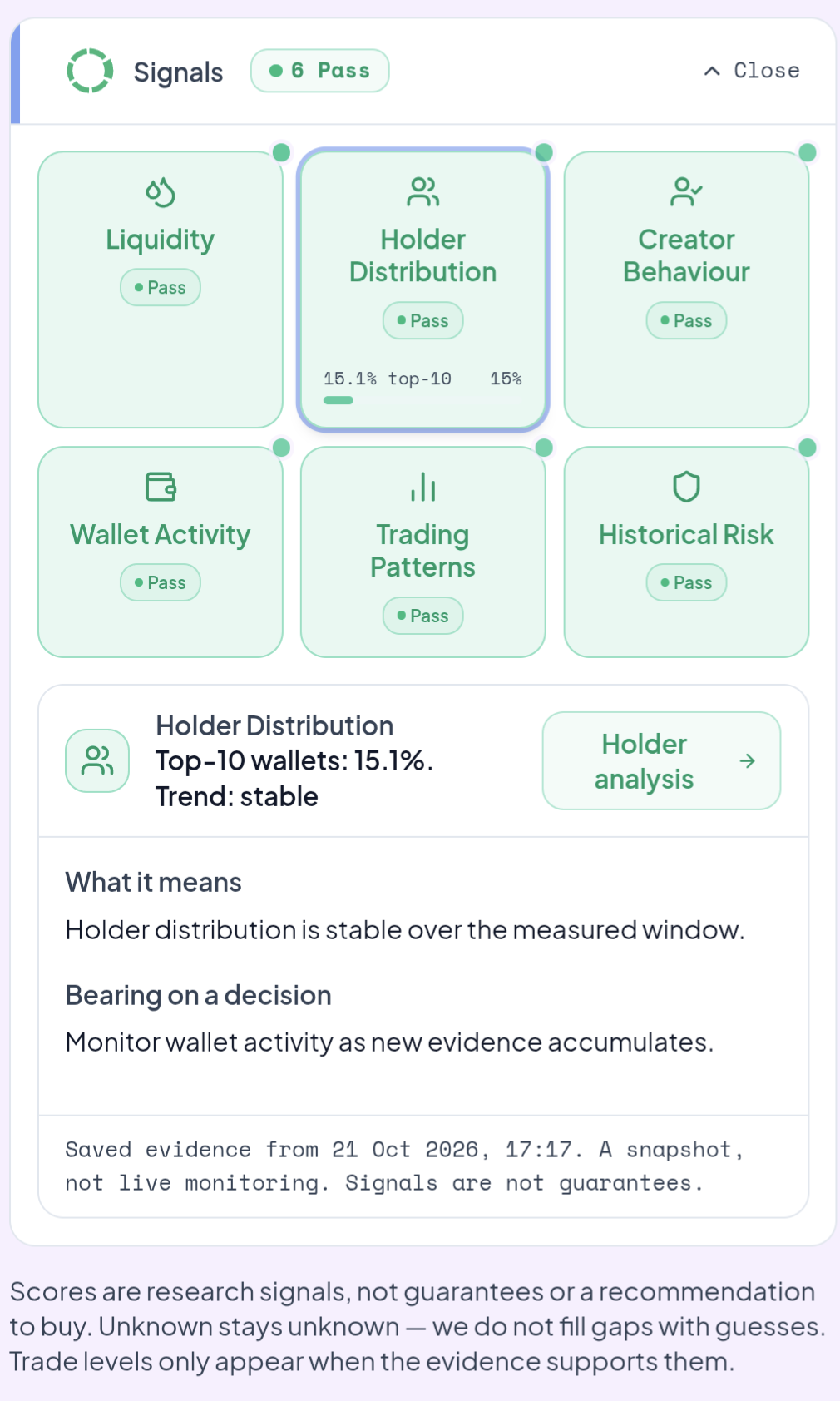
The aim is to make research more engaging and easier to follow, without reducing a complex token to a single reassuring colour.
Our reports separate the Health Score from the Rug Risk Rating, because they answer different questions. A token can show relatively few detected structural risks while still facing weak buying pressure or an unattractive entry.
Four core outputs connect the summary to its evidence: the Overall Health Score, Rug Risk Rating, plain-English AI Verdict and Detailed Risk Breakdown. Open the supporting findings rather than treating any score as a standalone answer.
You can start with the overview, then investigate the evidence that matters to you. For more detail on what goes into the report, read how MemeAssist analyses Solana tokens.
Get guidance that fits your stage of the trade
Your questions change once you own a token.
Before buying, you might want to understand whether the evidence supports an entry. After buying, you may care more about whether liquidity is weakening, large holders are selling or your original reasoning still holds.
MemeAssist lets you choose your angle:
| Your situation | Where to focus |
|---|---|
| Thinking of getting in | Entry conditions, safety findings, setup quality and reasons to wait |
| Already holding | Exit liquidity, sell pressure, whale activity and changed risks |
| Watching a fresh launch | Available launch evidence, early-wallet exposure and new observations as they emerge |
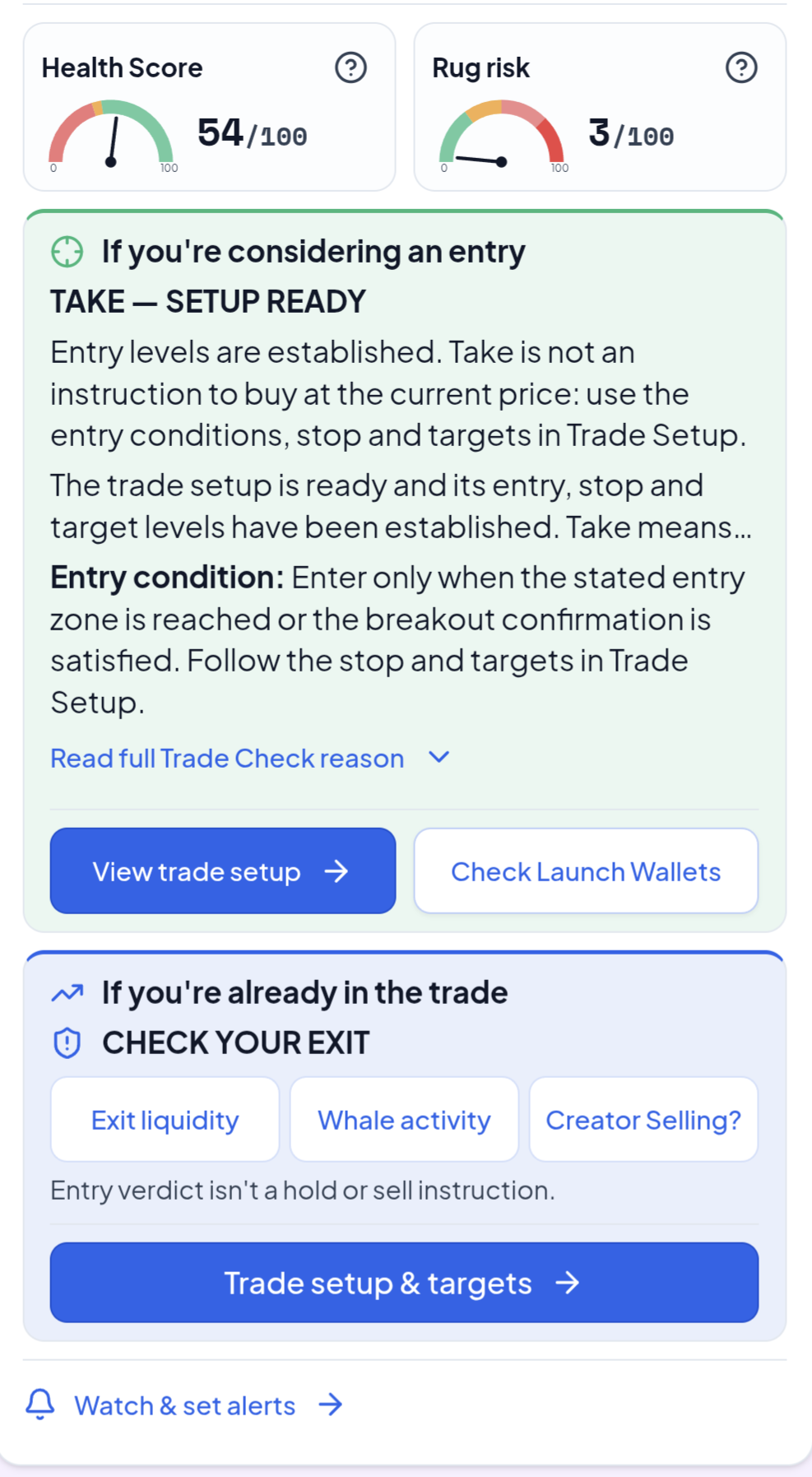
This keeps the report relevant to the decision you’re researching.
An entry assessment also needs to stay in context. A “Wait” result for someone considering a purchase is not automatically an instruction to sell an existing position. Likewise, “Take — Setup Ready” means reviewing the stated entry conditions, stop and targets—not buying immediately at any price.
See what changed since you last checked
A token’s first report is only the beginning of its story.
Liquidity can grow while buying pressure weakens. A score can improve while a particular concern remains unresolved. Looking at the latest number alone can hide those changes.
MemeAssist lets you compare saved analyses so you can see which supported measures improved, worsened or stayed unchanged.
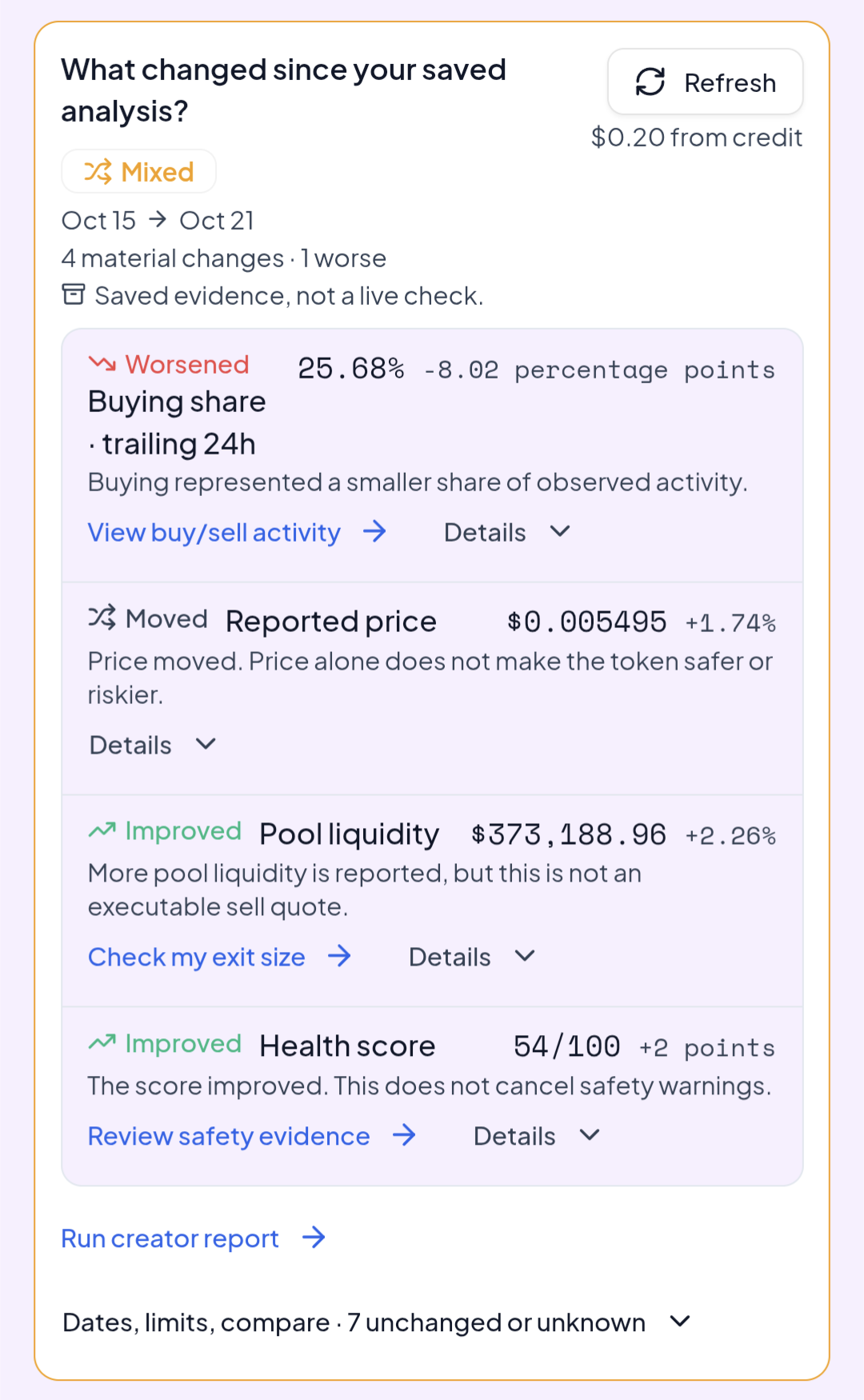
In this comparison between saved observations on 15 and 21 October 2026:
- The Health Score increased by two points.
- Reported pool liquidity increased by approximately 2.26%.
- Buying’s share of observed trailing-24-hour activity fell by 8.02 percentage points.
That gives you more context than “the score went up”.
You can use comparisons to revisit your original reasoning: has the concern you were watching improved, remained unresolved or become more significant?
Comparing saved analyses is different from changing a chart’s timeframe. One examines how recorded evidence changed between observations; the other changes the period being measured. Saved comparisons also leave gaps between observations, so always check their dates and coverage.
Explore early supply through the wallet constellation
A current holder list shows who holds tokens now. Researching the earliest buys can help you understand how initial supply exposure developed.
Our wallet constellation brings that early-buy evidence into a visual view, with wallet-level details you can explore.
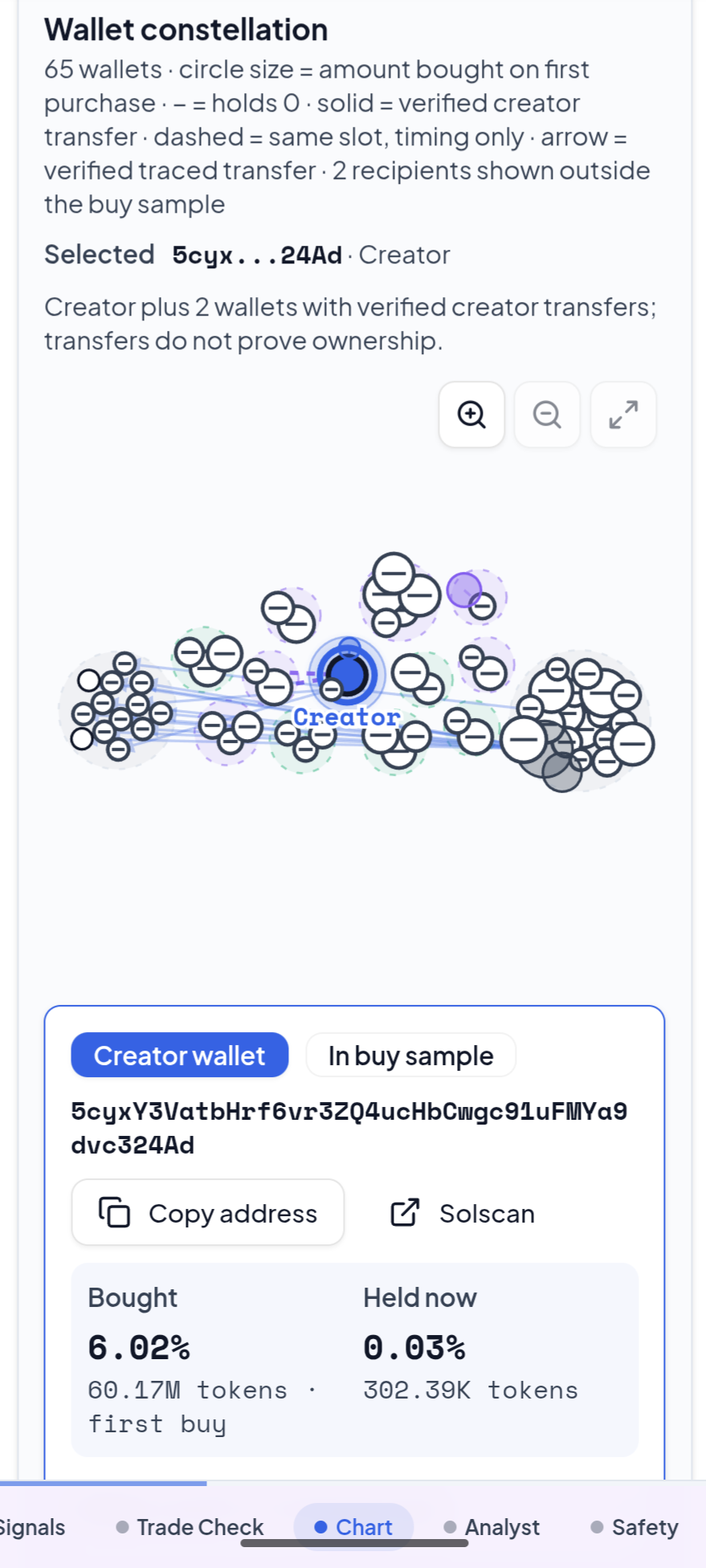
In the example above:
- Circle size represents the amount bought on the first purchase.
- A minus symbol indicates zero current holdings.
- Solid connections indicate verified creator transfers.
- Dashed connections indicate same-slot timing only.
- The selected-wallet panel separates the initial purchase from current holdings.
This helps you investigate questions that a present-day ranking may miss. Does an early buyer still hold their initial exposure? Has supply moved elsewhere? Which connections are supported by verified transfers?
Those distinctions matter particularly when researching new launches, where the available trading history may be limited.
The visual key also keeps different types of evidence separate. Same-slot timing does not establish common ownership, and a transfer does not automatically mean a sale. Use the constellation to identify questions worth investigating further.
Review a conditional trade setup as a second opinion
Passing a security check does not establish a good entry.
You still need to consider the price structure, the conditions behind the trade and what would invalidate the idea.
Every full MemeAssist analysis checks for a Trade Setup. When the available structure supports one, the report can provide entry, stop-loss and target levels, alongside the conditions behind them.
That gives you a framework to review:
- Where is the proposed entry area?
- What needs to happen before the entry is valid?
- Where does the setup stop making sense?
- How does the potential reward compare with the downside?
When the evidence cannot support a validated setup, the report should say so.
Use these levels as a second opinion alongside your own research. They are time-sensitive, and fees, slippage and changing liquidity affect what can actually be executed. MemeAssist does not place trades or guarantee fills.
Keep watching the conditions that matter
Once you’ve identified a concern or a potential setup, you may want to follow it without repeatedly opening the same report.
You can add a token to your watchlist and configure supported alerts around the evidence you care about. These include:
- Trade Check becoming Take, where the supported rule is available.
- Entry, target and invalidation levels.
- Price movements.
- Creator selling.
- Whale activity.
- Health changes and supported liquidity conditions.
Notifications are available in-app, with optional Telegram delivery.
This connects your initial research with what you monitor afterwards. If your concern is creator selling, you can follow that behaviour. If you’re waiting for a setup condition, you can configure an available alert around the relevant level.
Watchlist monitoring uses prepaid account credit. Check the current monitoring price before activating it, and remember that delivery depends on data providers and polling. Alerts prompt a fresh review; they cannot guarantee protection against a sudden market event.
Our MemeAssist workflow guide explains how analysis and monitoring fit together.
Ask follow-up questions about the token
Sometimes the report raises a question you want to explore in more depth.
Ask the Analyst lets you ask token-specific questions grounded in the evidence collected for that report.
You might want to investigate which concern deserves the most attention, understand a holder-distribution finding or clarify what the liquidity evidence does—and does not—establish.
This gives you a way to continue the investigation from the report itself. The current answer price is shown before you submit a question.
As with the rest of the report, AI explanations can make mistakes. Check important conclusions against the supporting evidence and its observation time.
Check what your position could actually sell for
The price on a chart does not tell you how much you could receive for selling your position.
That depends partly on your trade size and the liquidity available when you sell.
Our Exit Liquidity Check lets you request point-in-time sell quotes at chosen sizes, showing estimated proceeds and exit cost relative to a reference price.
For an existing holder, this adds a practical question to the research: how does the available market depth affect my position size?
The result is an estimate, not an executed transaction or a guaranteed fill. Market conditions can change after the quote.
Look beneath the headline volume
A token can have substantial activity while sellers dominate the flow.
MemeAssist includes buy-versus-sell volume views and holder-behaviour summaries so you can investigate what sits behind headline figures.
You can explore supported time windows and review whether tracked whales are accumulating, holding or distributing.
These views help you ask more precise questions. Is the observed activity mostly buying or selling? Does the short-term picture differ from the longer window? How much of the apparent stability comes from the particular wallets being tracked?
The coverage and measurement period matter as much as the headline number.
Why use MemeAssist alongside free tools?
Free tools remain useful parts of memecoin research.
DEX Screener provides charts, market discovery, watchlists and alerts. Bubblemaps offers visual wallet research and historical distribution views. Explorers let you inspect individual transactions.
We built MemeAssist for people who want to bring that investigation into a guided report, with explanations and follow-up organised around the same token.
| What you want to do | How MemeAssist helps |
|---|---|
| Understand the main findings | Visual summaries with supporting explanations |
| Research a possible entry | Stage-specific guidance and conditional setups |
| Review an existing position | Exit-liquidity context, selling pressure and wallet evidence |
| Revisit an earlier assessment | Comparisons between saved analyses |
| Investigate launch exposure | Early-buy wallet constellation |
| Follow important changes | Optional watchlist monitoring and alerts |
| Explore an unanswered question | Token-specific Ask the Analyst |
The value is in how these features work together. You can use MemeAssist alongside your existing research tools and follow important findings back to their underlying evidence.
MemeAssist vs RugCheck, DeFade and paid research platforms
For a Solana trader who wants a guided second opinion without a recurring subscription, MemeAssist is built to be the first report you open. The advantage is not that we invented wallet analysis or alerts. It is that you can follow the same token from a visual risk finding to an entry condition, a position-sized exit check and a later evidence comparison, without assembling the explanation yourself.
The comparison below uses providers' published information checked on 21 October 2026. These are different products, not identical scan packages or a measured accuracy ranking. Features, coverage and prices can change; follow the linked sources for current terms.
| Tool | Published access or price | Where it earns its place | Why choose MemeAssist for this task? |
|---|---|---|---|
| RugCheck | Public token-checking interface; paid API plans are a separate product. | A useful first pass on token risk findings. Inspect the actual report rather than assuming any checker covers every risk. | Choose MemeAssist when you want the risk evidence explained alongside conditional entry plans, your holding context and saved changes—not just an initial check. |
| DeFade | Free: 3 core scans/day. Pro: $24/month with 300 scans. Its site also lists higher-volume plans. | Multi-chain research, with paid deep wallet and bundle modules. Its paid plan also lists an exit-liquidity calculator, bubble maps and smart-money tools. | Choose MemeAssist for a Solana-focused, visual decision workflow and pay-as-you-go use without committing to a monthly plan. We do not claim wallet graphs or exit tools are exclusive to us. |
| DEX Screener | Public charts and discovery tools. | Chart-led exploration, pairs and market activity. Watchlists and alerts overlap with parts of our workflow. | Use MemeAssist when the next question is what the evidence means for an entry or an existing holding. Keep your preferred chart tool alongside it. |
| Bubblemaps | Visual wallet research; check its current access terms for the features you need. | Specialist exploration of wallet connections and distribution. | Choose MemeAssist when you want early-buy exposure explained in the same report as risk, setup and holding context. A constellation is not proof of common ownership. |
| Nansen Pro | Official help lists $69/month monthly, or $49/month billed annually ($588/year). | Broad multi-chain analytics, wallet labels, portfolios and smart alerts. Its free tier also retains a limited smart-alert option. | Choose MemeAssist if your task is a small number of Solana token decisions rather than a broader multi-chain analytics subscription. These are not feature-for-feature equivalents. |
Compare your actual spend, not just the headline price
At our checked $0.20 analysis price, a $5 top-up covers 25 analyses if you spend it only on analyses. You are buying account credit, not a bundle that also includes unlimited monitoring, questions or quotes. An occasional researcher can start below the monthly commitment of a paid analytics plan.
High-volume users should do the opposite calculation too. DeFade Pro's $24 divided by all 300 included scans is $0.08 per scan if you use the full allowance; its free tier may already be enough for basic checks. MemeAssist is not automatically cheaper for that usage. Compare the depth you need, how often you research and the follow-up tools you will actually use.
Our live pricing feed, checked on 21 October 2026, lists an analysis at $0.20, Ask the Analyst at $0.10 per question, an Exit Liquidity Check at $0.05 and daily Watchlist monitoring at $0.10 per token. Creator investigations have a first-successful-check allowance per account and token, then cost $0.05 per new run. Separate fresh-launch monitors cost $0.10 for 3 hours, $0.20 for 6 hours or $0.40 for 12 hours. Check current pricing and the action confirmation before spending credit.
Evidence you can inspect, not a promise that we predict winners
Our Research Centre publishes dated studies with populations, measurement methods and limitations. Read what was actually measured: a report-score outcome, a shadow price observation and an executed trade are not interchangeable. These studies are not a controlled head-to-head test against RugCheck, DeFade or Nansen, and we do not use them to claim superior returns or detection accuracy.
What you can evaluate directly is the report: does it separate safety from setup, explain the finding, identify missing evidence, show when the observation was made and help you decide what to check next? That is the standard we want MemeAssist to earn your choice on.
Try a full analysis before adding credit
Eligible new accounts receive one free full analysis, with no card or wallet required at signup.
As advertised on 21 October 2026, $5 buys 25 full analyses—equivalent to $0.20 per analysis—through prepaid account credit, without a subscription.
Monitoring and other paid actions have their own prices, so check the current cost shown before using them.
Start with a token you already know. Choose your trading stage, read the main findings and explore the supporting visuals. If you return to it later, compare the saved evidence to see what changed.
Run your first MemeAssist analysis
Learn more: How our analysis works · How to use MemeAssist · Explore a saved report
Frequently asked questions
How is MemeAssist different from a free memecoin checker?
We combine visual token research, AI explanations, guidance for different trading stages, saved-analysis comparisons and optional monitoring. Individual features overlap with other tools; MemeAssist brings them together in one workflow.
Can I use MemeAssist with DEX Screener or Bubblemaps?
Yes. You can use MemeAssist alongside charts, wallet-analysis platforms and blockchain explorers to investigate findings further.
Can MemeAssist show whether a token is improving?
You can compare supported evidence between saved analyses. Different measures may move in different directions, so we show the changes rather than assuming an improving score tells the whole story.
Does low rug risk mean I should buy?
No. Detected structural risks and the quality of a potential trade are separate considerations. Our Rug Risk Rating is a score, not a probability or a guarantee of safety.
Do I need to connect my wallet?
No wallet connection or transaction signature is required to analyse a token.
Does MemeAssist prevent rug pulls or guarantee profitable trades?
No. MemeAssist provides automated informational research. Reports may be incomplete, mistaken or outdated, and alerts may be delayed. Memecoins are highly speculative, and you can lose your entire investment. Use our analysis as one input into your own decision.
Why pay for MemeAssist if DeFade has free scans?
DeFade's published free tier includes three core scans a day and can be useful for basic checks. Choose MemeAssist when you want its Solana-focused visual report, separate safety and setup context, saved comparisons and optional follow-up tools without a recurring subscription. It is not a claim that all competitor features are paid or that MemeAssist is always cheaper.
Is MemeAssist cheaper than Nansen or DeFade Pro?
It depends on usage. As checked on 21 October 2026, MemeAssist analyses cost $0.20 from prepaid credit with a $5 minimum top-up; monitoring and other paid actions are separate. DeFade Pro lists $24/month for 300 scans, and Nansen Pro's help lists $69/month monthly or $49/month billed annually. Heavy users should compare included allowances and feature needs rather than treat these as identical packages.
Sources & further reading
- DeFade official pricing and included modules — checked 21 October 2026
- DeFade official memecoin analyser overview
- RugCheck public token checker
- Nansen Pro official pricing and features help — checked 21 October 2026
- DEX Screener
- Bubblemaps wallet research
- MemeAssist public pricing feed — checked 21 October 2026
Related guides
Make the Most of MemeAssist
Check a Solana token, read Trade Check and the underlying risk evidence, choose the right report view, then monitor conditions that could change your decision.
How the AI Analyzes Tokens
How MemeAssist's AI analyzes Solana tokens: the on-chain and behavioural signals it evaluates, and how they become a health score, rug risk rating, and AI verdict.
MemeAssist vs RugCheck (2026)
MemeAssist vs RugCheck compared: contract checks, holder analysis, creator history, AI scoring and access terms. Which Solana rug scanner should you use?
MemeAssist vs DexScreener (2026)
MemeAssist vs DexScreener: compare chart-led token discovery with evidence-backed health checks, interpreted setups, watchlists and alerts.
MemeAssist vs Bubblemaps (2026)
MemeAssist vs Bubblemaps compared: visual holder maps vs AI-scored holder clustering, multichain support, creator history, pricing and which tool suits which trader.
MemeAssist vs Nansen Solana (2026)
MemeAssist vs Nansen Solana compared: Smart Money wallet labels and analysis versus meme coin health, creator signals, outcomes, setups and alerts.
Continue: Before You Buy
More evidence-led reading for this decision stage.
Run these checks automatically
Paste any Solana mint address into the MemeAssist analyzer for holder intelligence, authority checks, creator history and an AI health score in one report. New accounts get 1 free full token analysis with Trade Setup. Further analyses and other paid tools require account credit.
Try with 1 free full analysis